Everything you need to integrate Mobile Wallet OS — from your first API call to production deployment. SDKs, guides, and reference documentation.
1import { MobileWalletClient } from '@mobilewallet/sdk';
2
3const client = new MobileWalletClient({
4  apiKey: process.env.MOBILE_WALLET_API_KEY,
5  environment: 'sandbox'
6});
7
8// Your first transfer
9const transfer = await client.transfers.create({
10  amount: 1000,
11  currency: 'XOF',
12  destination_rail: 'orange_money',
13  destination_market: 'SN',
14  recipient: {
15    phone: '+221765432101',
16    provider: 'orange'
17  }
18});Follow our guides to implement common integration patterns — from your first transfer to handling webhooks and compliance.
We provide official SDKs for the most popular programming languages. Each SDK handles authentication, retries, and webhook verification out of the box.
See how a single request flows through the OS — abstracting rails, handling compliance, and routing liquidity automatically.
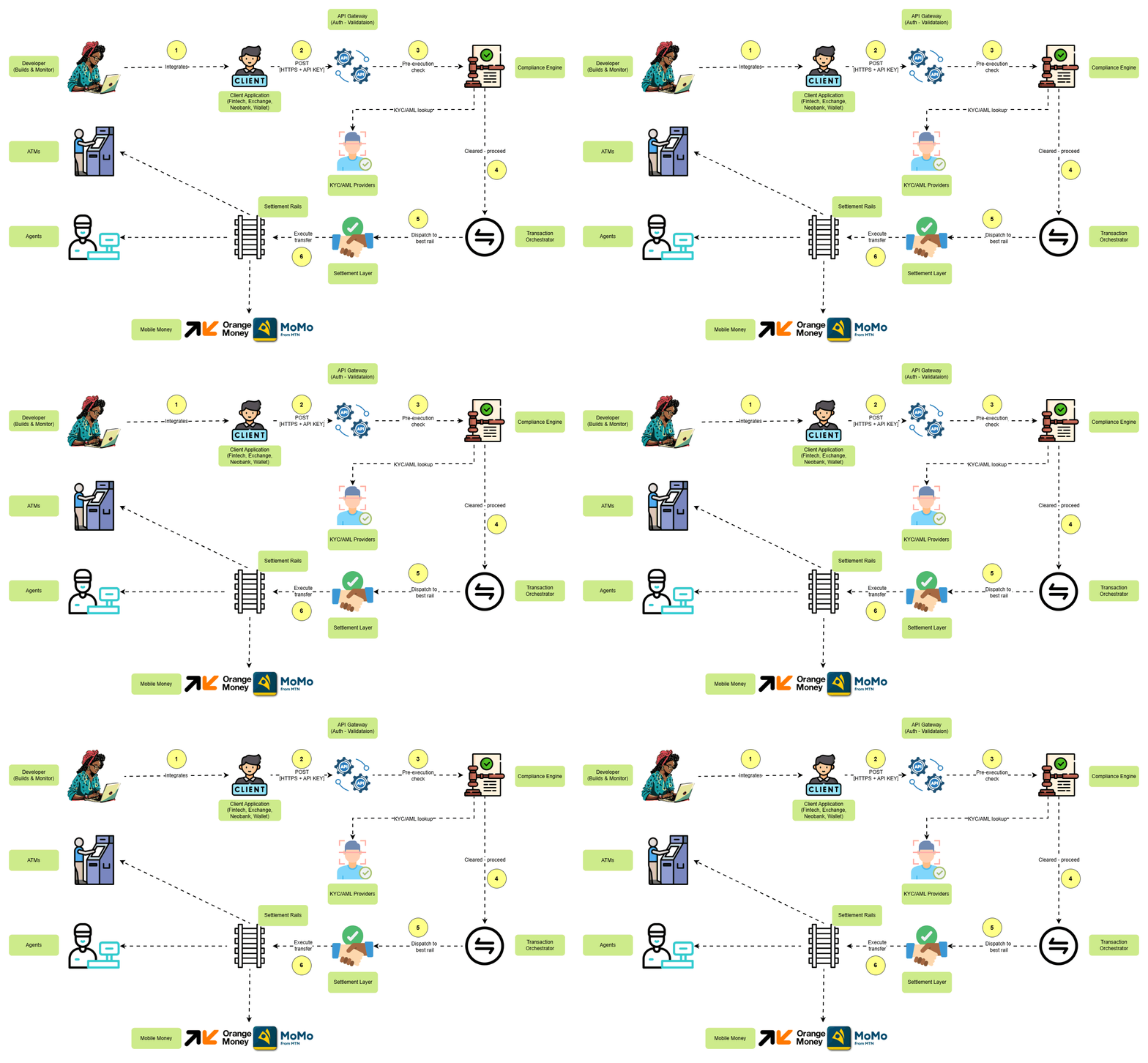
Your app sends a single POST request with amount, currency, destination rail, and recipient details. One unified API surface — no rail-specific SDKs required.

1const { MobileWalletClient } = require('@mobilewallet/sdk');
2
3const client = new MobileWalletClient({
4  apiKey: 'your_api_key',
5  environment: 'sandbox'
6});
7
8async function createTransfer() {
9  try {
10    const transfer = await client.transfers.create({
11      amount: 50000,
12      currency: 'XAF',
13      destination_rail: 'mtn_momo',
14      destination_market: 'CM',
15      recipient: {
16        type: 'mobile_money',
17        phone: '+237612345678',
18        provider: 'mtn'
19      },
20      reference: 'txn_' + Date.now()
21    });
22
23    console.log('Transfer created:', transfer.id);
24    console.log('Status:', transfer.status);
25  } catch (error) {
26    console.error('Error:', error.message);
27  }
28}Copy-paste ready code snippets to accelerate your integration. This example shows how to initiate a transfer across any rail with proper error handling.
1// Express.js webhook handler
2const crypto = require('crypto');
3
4app.post('/webhooks/transfer', (req, res) => {
5  const signature = req.headers['x-webhook-signature'];
6  const payload = JSON.stringify(req.body);
7
8  // Verify webhook signature
9  const expectedSignature = crypto
10    .createHmac('sha256', process.env.WEBHOOK_SECRET)
11    .update(payload)
12    .digest('hex');
13
14  if (signature !== expectedSignature) {
15    return res.status(401).json({ error: 'Invalid signature' });
16  }
17
18  const event = req.body;
19
20  switch (event.type) {
21    case 'transfer.settled':
22      console.log('Transfer settled:', event.data.transaction_id);
23      // Update your database
24      break;
25    case 'transfer.failed':
26      console.log('Transfer failed:', event.data.reason);
27      // Notify customer
28      break;
29  }
30
31  res.json({ received: true });
32});Copy-paste ready code snippets to accelerate your integration. Learn how to verify webhook signatures and process settlement events securely.
RESTful API design with consistent request/response shapes across all rails.
From API references to community support — we've got you covered.
Connect with hundreds of developers building on Mobile Wallet OS. Share ideas, get help, and stay updated on new features.
FAQ
Everything you need to know about integrating with our API.
Our engineers are here 24/7.
How do I get an API key?
Sign up for a developer account in the Operator Dashboard. Sandbox keys are available immediately; production keys require a brief onboarding call.
What are the rate limits?
Sandbox: 10 requests per second. Production: 100 requests per second by default. Higher limits available on enterprise plans.
Do you have a sandbox environment?
Yes. Our sandbox simulates live rail behavior including response times, error conditions, and webhook delivery. Perfect for integration testing.
How do webhooks work?
We send HTTP POST requests to your configured endpoints for settlement confirmations, failures, and other events. Each webhook includes a signature header for verification.
What SDKs do you support?
Official SDKs for Node.js, Python, Go, Ruby, PHP, and Java. Community SDKs for other languages are listed in our documentation.